Creative Testing·Aug 17, 2026
Learn how ecommerce teams can evaluate AI ad creative tools by workflow stage, format, output, review needs, and iteration support.
By Sprokl Team · Updated August 17, 2026

Choosing an AI ad creative tool is not just a question of which product can generate the most images or videos. Ecommerce teams need to know which part of the creative workflow they are trying to improve: producing more variations, creating product imagery, making short-form video, analyzing performance, or turning campaign signals into the next creative brief.
The most useful tool is therefore the one that fits the bottleneck. This guide explains the main types of AI ad creative tools, how to compare them, and how to build a practical workflow without confusing faster production with proven performance.
Creative production has become an operating constraint for many ecommerce advertising teams. A campaign may need fresh product images, new hooks, multiple placements, short-form video, or localized variations. If every variation requires a separate manual production cycle, the team may have fewer ideas to test and less time to learn from the results.
The IAB 2025 Digital Video Ad Spend & Strategy Full Report provides market context rather than a tool ranking. Its public summary reports that U.S. digital video ad spend reached $64 billion in 2024 and was projected to reach $72 billion in 2025. It also describes the ecosystem as moving into a phase shaped by “GenAI, precision targeting, and performance-driven KPIs.” Those figures describe the market; they do not prove that any specific AI tool will improve an individual campaign.
The practical question for an ecommerce team is narrower: can a tool help the team produce and evaluate meaningful creative variations while preserving product accuracy, brand context, and a clear testing process?
An AI ad creative tool applies generative or analytical capabilities to paid advertising assets and workflows. Depending on the product, it may generate images, copy, product scenes, videos, UGC-style assets, or variations for different placements. Some tools also analyze live creatives, review competitor activity, check compliance, or assign a pre-launch score.
Meta Advantage+ Creative describes a platform-native set of tools for generating and optimizing ad images, videos, audio, text, sizing, and audience-specific variations. This is a useful definition of one category of AI ad creative capability: the system adapts creative for a media platform and its placements.
The category is broader than an AI image generator. A general image tool may help explore a visual direction, while an ad creative platform may also structure layouts, create copy variations, adapt formats, or connect creative analysis to production. The distinction matters because the right tool depends on the job the team needs to complete.
It is also important to separate capabilities from outcomes. A product page can document that a tool generates a format or offers a scoring feature. That does not establish that the output will win a campaign, produce a specific return, or replace human review.
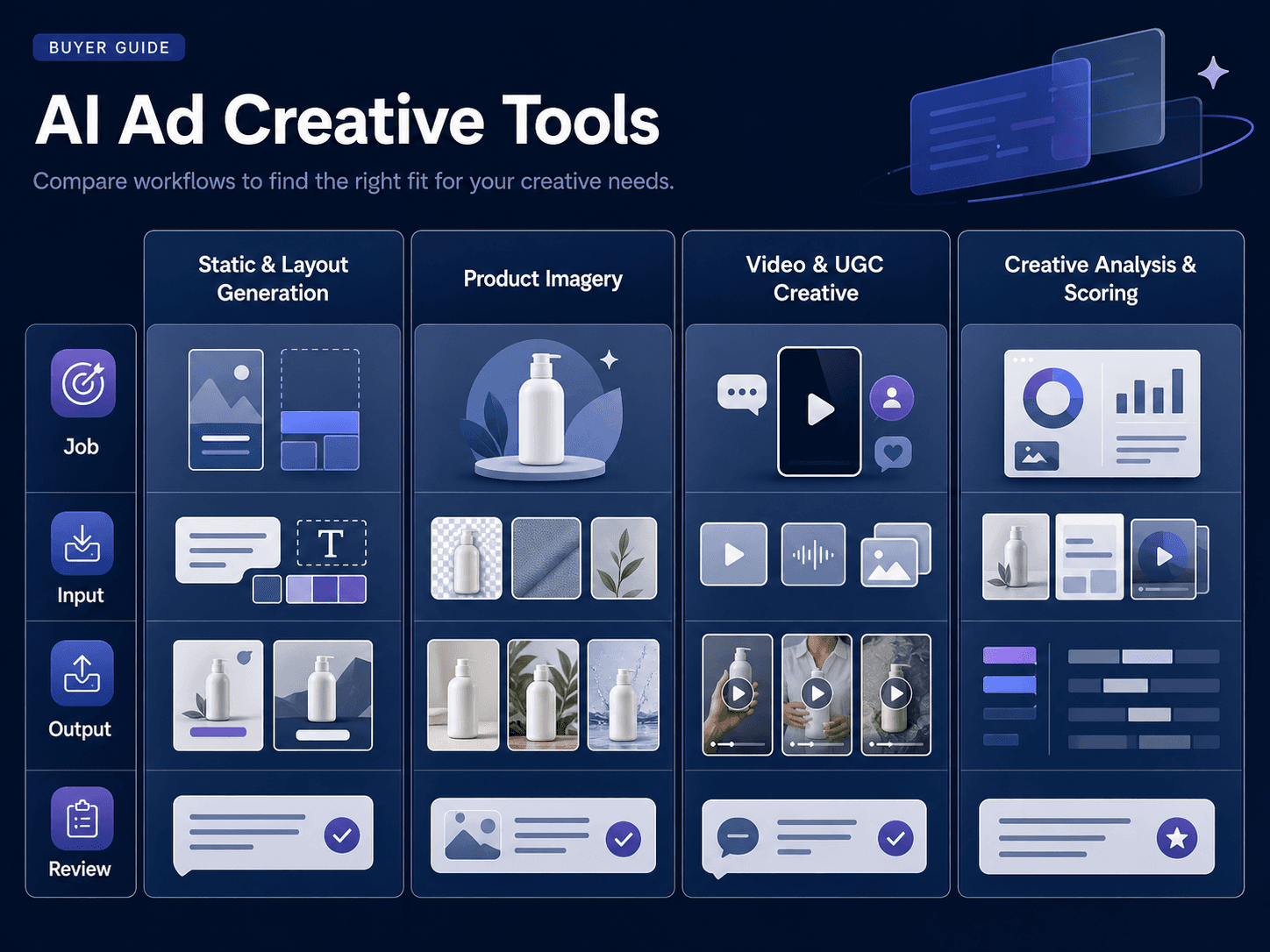
These tools create static ad concepts, layouts, copy variants, or resized assets from product information and a brief. They are useful when the team has a clear product but needs more combinations of hooks, visual treatments, offers, and placements.
The main evaluation question is not how many outputs the tool can produce. It is whether the outputs represent meaningful creative ideas and whether the team can review and edit them efficiently.
Use this category when the message is clear but the team needs more static concepts, layouts, or placement-ready variations.
Some tools focus on turning product images into lifestyle scenes or ecommerce visuals. This can help a brand explore supporting product imagery without arranging a new photo shoot for every variation.
However, product accuracy remains a critical review step. Check proportions, packaging, labels, colors, materials, and any visual claim before an asset is used in an ad. A visually attractive scene is not useful if it misrepresents the product.
Use product-scene tools when the bottleneck is supporting imagery around an approved product asset, not when the team needs campaign evidence.
Video-focused tools can generate short-form ads from a brief, create avatar-led explainers, repurpose existing footage, or produce UGC-style variations. These tools solve different problems. Repurposing is useful when a team already has long-form footage; generation from a text brief is useful when the team has a concept but no production setup; avatar tools address a presenter-led format.
Do not compare all video tools as if they perform the same job. A clip-repurposing product and a text-to-video product should be evaluated against different inputs, outputs, editing requirements, and distribution channels.
Use video production tools when the concept and message are sufficiently clear but the team needs producible short-form variations.
Some platforms add analysis to generation. AdCreative.ai, for example, lists creative generation, product photoshoots, ad copy generation, creative insights, competitor insights, compliance checking, and creative scoring among its capabilities. Those features show how a competitor positions the category across generation, analysis, prediction, and automation.
A score can help a team prioritize which variants to inspect first, but it should not be treated as campaign evidence. The real test is how the creative performs in the relevant audience, placement, objective, and measurement setup.
Analysis becomes meaningful only when real campaign evidence exists. Treat predictive scores as prioritization signals, not proof of performance.
These categories can overlap, but their jobs are different: production tools create or adapt assets, analysis tools help teams review or prioritize them, and advertising platforms handle delivery and reporting. A tool that combines several functions should still be evaluated by the specific workflow stage it improves.
| Workflow Stage | Tool Category | Best For | Typical Input | Typical Output | Human Judgment Needed | Does Not Replace |
|---|---|---|---|---|---|---|
| Ideation / creative direction | Ideation and creative-direction tools | Exploring angles and message directions | Product information, audience context, existing creative direction | Creative angles, message directions, hook ideas | Relevance, brand fit, supported claims | Creative strategy or product review |
| Copy / script | Copy and script tools | Turning an angle into a producible message | Selected angle, product details, format, CTA | Hook, short script, scene/message structure | Tone, accuracy, claims, clarity | Final copy approval or production planning |
| Image / layout generation | Image and layout tools | Creating static concepts and placement variants | Product assets, brief, format requirements | Image variants, layouts, resized assets | Product accuracy, editing, final selection | Product photography review or campaign evidence |
| Product photography / lifestyle scenes | Product-scene tools | Exploring ecommerce settings around an existing product | Approved product image, scene direction, brand constraints | Product scenes, lifestyle images | Proportions, labels, materials, visual claims | A real photo shoot or product approval |
| Video production | Video production tools | Turning a message and assets into short-form variations | Script, product assets, scenes, format | Short video variations, edited clips, UGC-style outputs | Pacing, product accuracy, audio, captions, final selection | Media buying or campaign measurement |
| Analysis | Creative analysis tools | Reviewing or prioritizing creative after evidence exists | Live creative data, campaign context, review criteria | Observations, prioritization signals, reports | Interpretation and next brief | Advertising-platform reporting or causal proof |
| Workflow / iteration support | Creative workflow tools | Organizing assets, directions, briefs, and revisions | Product assets, angles, scripts, variations, review notes | Structured creative packages and next-brief inputs | What to make next and why | Automatic optimization or experiment execution |
Write down the problem before comparing products:
A tool that is excellent for product photography may be a poor fit for campaign analysis. A tool that generates video may not help with static product ads. Naming the bottleneck prevents a feature list from becoming the buying decision.
The Best AI Ad Creative Tools for Ecommerce Sellers 2026 guide says it evaluated tools across paid ad generation, product photography, short-form video, and organic social workflows. Its stated criteria include speed from brief to usable output, quality without heavy manual editing, platform coverage, production-volume cost, and learning curve.
Those are practical comparison criteria. Add a few ecommerce-specific checks:
The answers should be based on a small, consistent evaluation using the team's own product assets. Vendor demos are useful for understanding features, but they are not a substitute for reviewing real outputs.
Use this short checklist before comparing specific products:
Pre-launch scores and recommendations may help prioritize a review queue. They do not replace a live test. Campaign results depend on the audience, offer, placement, budget, timing, landing experience, and other conditions outside the creative file.
Treat a prediction as a hypothesis about what to inspect or test next. Keep the actual campaign decision tied to the relevant advertising platform and the evidence available from that test. Detailed testing methodology belongs in the creative testing framework, not in a tool-category ranking.
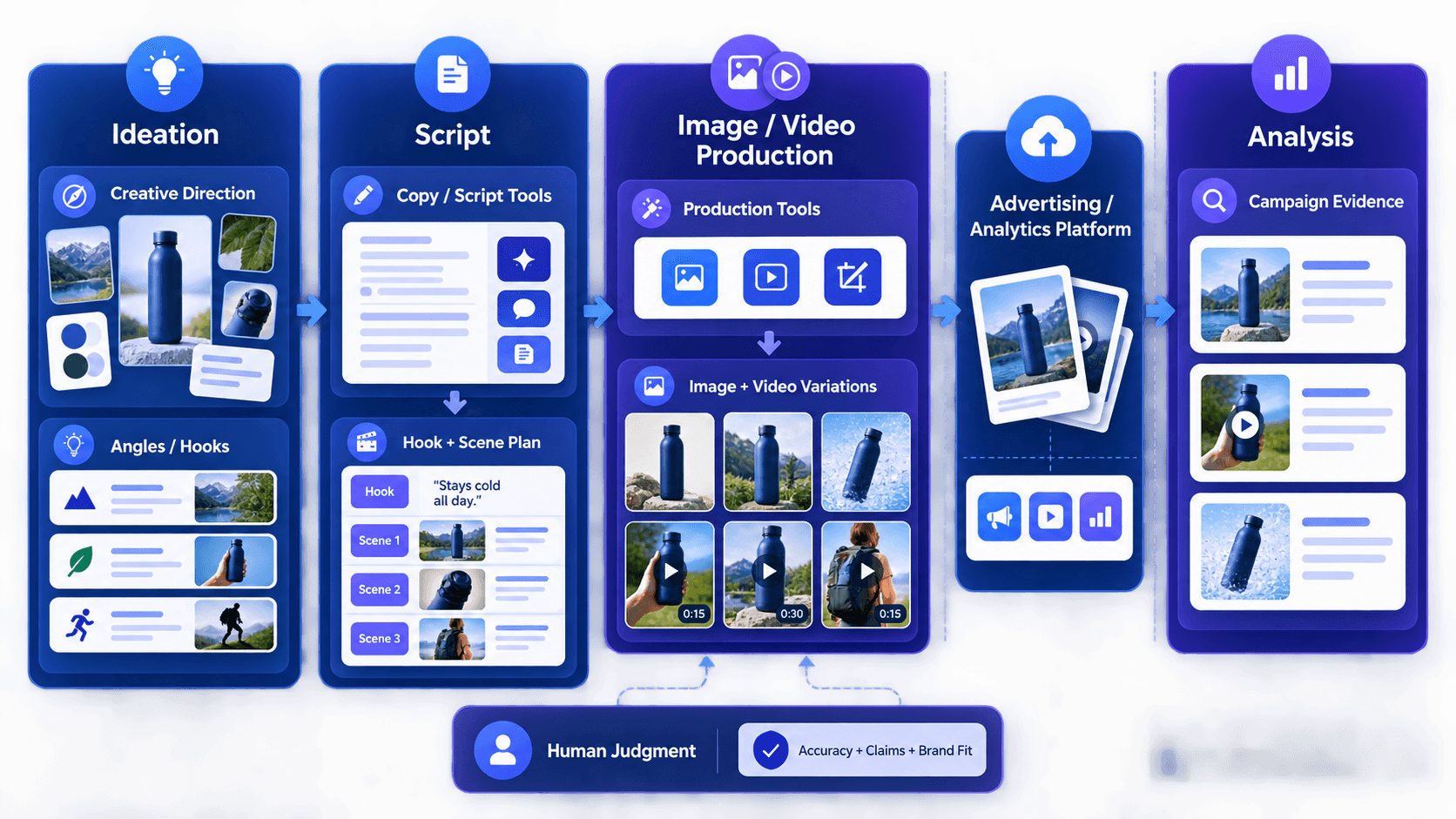
Start with accurate inputs: product assets, core benefits, constraints, customer language, offer details, intended audience, placement, and campaign objective. Sprokl's creative angles workflow is relevant at this stage because the team needs to define the message direction before producing variations. More generation does not fix incomplete or inaccurate context.
Create variations around explicit dimensions such as hook, product demonstration, visual setting, message, proof point, call to action, or format. Tools such as an AI video ad generator, AI ad scripts, or video variations support different production tasks; they do not replace the team's decision about what should be compared. Avoid producing a large collection of near-duplicates with no clear reason for the difference.
Before testing, review claims, logos, labels, product appearance, accessibility, brand voice, and platform requirements. Human review is especially important when generated imagery or copy could imply a feature, result, ingredient, or use case that the product does not support.
Define what is being compared, which audience and placement are in scope, what measurement window will be used, and what decision will follow. The exact setup will differ by campaign, but the comparison should be clear enough to interpret. This is campaign methodology, not a claim that an AI creative tool automatically runs or optimizes the test.
Record which creative elements were tested and what the result suggests. A useful learning might lead to a new hook, a different product demonstration, a refreshed format, or a narrower audience hypothesis. The purpose of AI is not to create an endless stream of disconnected assets; it is to make the next creative decision more informed.
Amazon Ads' article on how agentic AI can help improve ad creative performance describes a signal-informed approach: shopping, browsing, and streaming signals can inform creative decisions, and Creative Agent can produce variants across streaming TV, display, and video. The article also discusses tailoring a value proposition to the customer moment and analyzing creative attributes across channels. These are workflow examples, not a guarantee that an AI-generated variant will perform better.
Consider a generic DTC team with product photos, a product description, approved product details, existing brand assets, and a campaign objective. The team needs to move from a concept to production, then hand the finished creative to its advertising and analytics platforms.
This handoff is why an all-in-one label is less useful than a clear category fit: each tool can contribute an output without owning the entire advertising system.
Sprokl can be introduced after the team has defined its creative inputs and testing question. Its natural role is to help ecommerce teams turn existing product assets into more structured creative variations, organize creative iteration, and prepare ideas for a clearer testing workflow.
That positioning is deliberately narrower than “AI makes winning ads.” Sprokl supports the production and organization layer around creative iteration. It can help teams work from product assets toward creative angles, scripts, and video variations, but it does not provide creative scoring, competitor intelligence, attribution, media buying, or automatic campaign optimization. The team and its advertising platforms still own the hypothesis, product and brand review, campaign setup, measurement, and scaling decision.
They can reduce manual production work for some formats and workflows, but the sources reviewed here do not establish that they replace creative strategy or human review. Product accuracy, brand judgment, claims review, and test design remain important responsibilities.
No. A score is a pre-launch signal or prioritization aid. It should be validated through an appropriate campaign test and interpreted alongside the conditions of that test.
Not automatically. A comparison should begin with the team's bottleneck. One tool may be strong for static variation, another for product imagery, and another for video or analysis. A smaller combination that fits the workflow may be more useful than a broad tool with capabilities the team does not use.
Start with one repeatable workflow and a clear input: for example, turning existing product assets into several distinct creative concepts for a defined placement. Review the outputs, document the editing effort, and decide whether the process produces useful ideas before expanding volume.
An AI ad creative tool is useful when it fits the team's actual bottleneck. Evaluate whether it helps the team move from accurate product context to meaningful creative variations, careful review, campaign handoff, and documented learning without confusing production capability with campaign performance.
Use market reports to understand the direction of the category, official documentation to verify platform capabilities, competitor pages to map product categories, and independent comparisons to define practical buying criteria. Then evaluate a short list with your own assets and your own workflow.
Keep exploring


Make the next creative move
Build, test, and iterate on ecommerce ad creatives faster with AI-powered concepts, scripts, and variations.