Ecommerce Marketing·Sep 9, 2026
Use this advertising creative brief template to turn product, audience, buyer problem, assets, and format into clear ecommerce video ad direction—with a worked example.
By Sprokl Team

An advertising creative brief turns a loose request—“make a video ad for this product”—into direction a creative team can actually use. It gives the team a shared answer to the questions that shape the work: Who is this for? What problem should the viewer recognize? What should the ad say, show, and ask the viewer to do?
For a small ecommerce or DTC team, the best brief is not the longest one. It is the shortest document that removes meaningful ambiguity before scripting, shooting, editing, or generating variations.
This guide gives you four practical outputs:
The brief helps a team make a clear creative decision. It does not predict performance, guarantee a winning ad, or replace product, brand, claims, or campaign review.
An advertising creative brief is a short planning document that connects business context and buyer context to an ad’s creative execution. Unlike a generic project brief, it does not stop at the deadline, budget, and list of deliverables. It records the buyer problem, the creative angle, the hook, the proof, the source assets, the format, and the CTA that should guide the work.
That distinction matters because an ad can be accurate and polished while still lacking a clear reason to watch. The brief gives the production team a point of view before the script or edit begins.
It is also different from a script. The brief defines the inputs and direction; the script turns that direction into spoken lines, on-screen text, scenes, and timing. If the script changes, the team can return to the brief to check whether the new execution still serves the same buyer and message.
Use the following fields to capture only information that affects the creative. Keep the answers concrete and short enough that a producer, strategist, or reviewer can scan them quickly.
These fields are enough to move from context to a first creative direction without turning the document into an agency-sized planning exercise.
Copy the block below and complete it for one product, audience, and ad objective.
The following creative brief example uses NestFold, a fictional foldable countertop dish rack for small kitchens. It contains no real customer data, sales results, benchmarks, or performance assumptions. Its purpose is to show how the same fields become usable direction.
Project / campaign context Short paid-social product video for a small-kitchen organization campaign. The ad should introduce NestFold to shoppers who are trying to keep a limited counter area usable after washing dishes.
Product NestFold is a fictional foldable countertop drying rack. It holds washed dishes while they dry and folds down for storage when the counter needs to be cleared.
Audience / ICP People living in small apartments or homes with limited counter space who wash dishes by hand and want a tidier kitchen routine.
Buyer problem or question “How do I dry dishes without leaving a bulky rack on my counter all day?”
Creative objective Help the viewer understand that the product addresses both parts of the problem: a place to hold dishes while they dry and a compact way to put the rack away afterward.
Creative angle Make counter space feel recoverable: the rack is useful when needed and folds away when the task is done.
Hook Open on a crowded counter, then show the rack folding flat with the on-screen line, “Need the counter back?”
Core message / benefit NestFold gives dishes a defined place to dry, then folds down so the counter can return to its everyday use.
Proof Show the rack open on the counter, place several washed dishes inside it, and then show the same rack folding flat. The visual demonstrates the use and storage action without adding an unsupported claim about capacity or drying speed.
Source assets Available inputs are a product photo, close-up images of the hinges and rack surface, a short demonstration clip of opening and folding, clean counter footage, a simple logo lockup, and approved product copy. No customer testimonial or performance data is available.
Video / ad format A 20–25 second vertical video for a mobile paid-social placement. Use a problem-led opening, quick demonstration in the middle, readable captions, and a clear product close.
CTA “See NestFold.”
Deliverables One vertical master with captions, one caption-free review file, and one shorter cutdown using the same approved direction.
Review inputs / constraints Keep the product fictional and visually consistent. Do not claim that NestFold saves a specific amount of space, dries dishes faster, improves health or safety, or delivers a sales outcome. Confirm product details, captions, logo use, and CTA with the designated reviewer before production.
This example is specific enough to direct a first script: start with the crowded-counter problem, show the open-and-fold action, reinforce the single benefit, and end with the product and CTA. It does not dictate every spoken word or editing choice.
The brief becomes useful when each important field changes an execution decision. The mapping below shows the handoff without repeating the full template.
| Brief field | Creative direction it informs |
|---|---|
| Buyer problem | The angle and opening situation; it determines what the viewer should recognize first. |
| Hook | The first frame, opening action, or first spoken/on-screen line. |
| Proof | The demonstration, product detail, comparison, or approved evidence shown in the body. |
| Source assets | What can be executed credibly with the material already available. |
| Format | Scene structure, pacing, framing, caption treatment, and approximate duration. |
| CTA | The ending shot, final line, on-screen instruction, and destination expectation. |
One approved brief can support a few bounded directions without becoming a new strategy document. Keep the project context, audience, product, and review constraints stable. Vary one creative input at a time when the goal is to understand a different way of expressing the same product value.
Angle variation: NestFold could be framed around recovering counter space, keeping a small kitchen visually tidy, or making hand-washing less awkward. Each angle emphasizes a different reason the product matters to the same buyer.
Hook variation: The opening could begin with the crowded counter, the rack snapping open, or the question “Where does this go when you’re done?” These hooks enter the same problem from a situation, a product action, or a buyer question.
Proof variation: The ad could prioritize the open-rack demonstration, the fold-flat storage action, or a close-up of the product detail that makes the action understandable. Choose proof the available assets can support.
Format variation: The direction could use a fast problem–demo–CTA sequence, a quiet hands-only product demonstration, or a short voiceover with supporting captions. The format changes how the message is delivered; it should not silently change the product promise.
For the broader process of forming hypotheses, comparing variations, and carrying learnings into the next iteration, see the creative testing framework. If you need help organizing the angle stage, the creative angles guide is the more relevant next step.
Before the brief moves into scripting or production, confirm:
If a reviewer cannot tell what the ad should open with, demonstrate, and ask the viewer to do, the brief needs another pass.
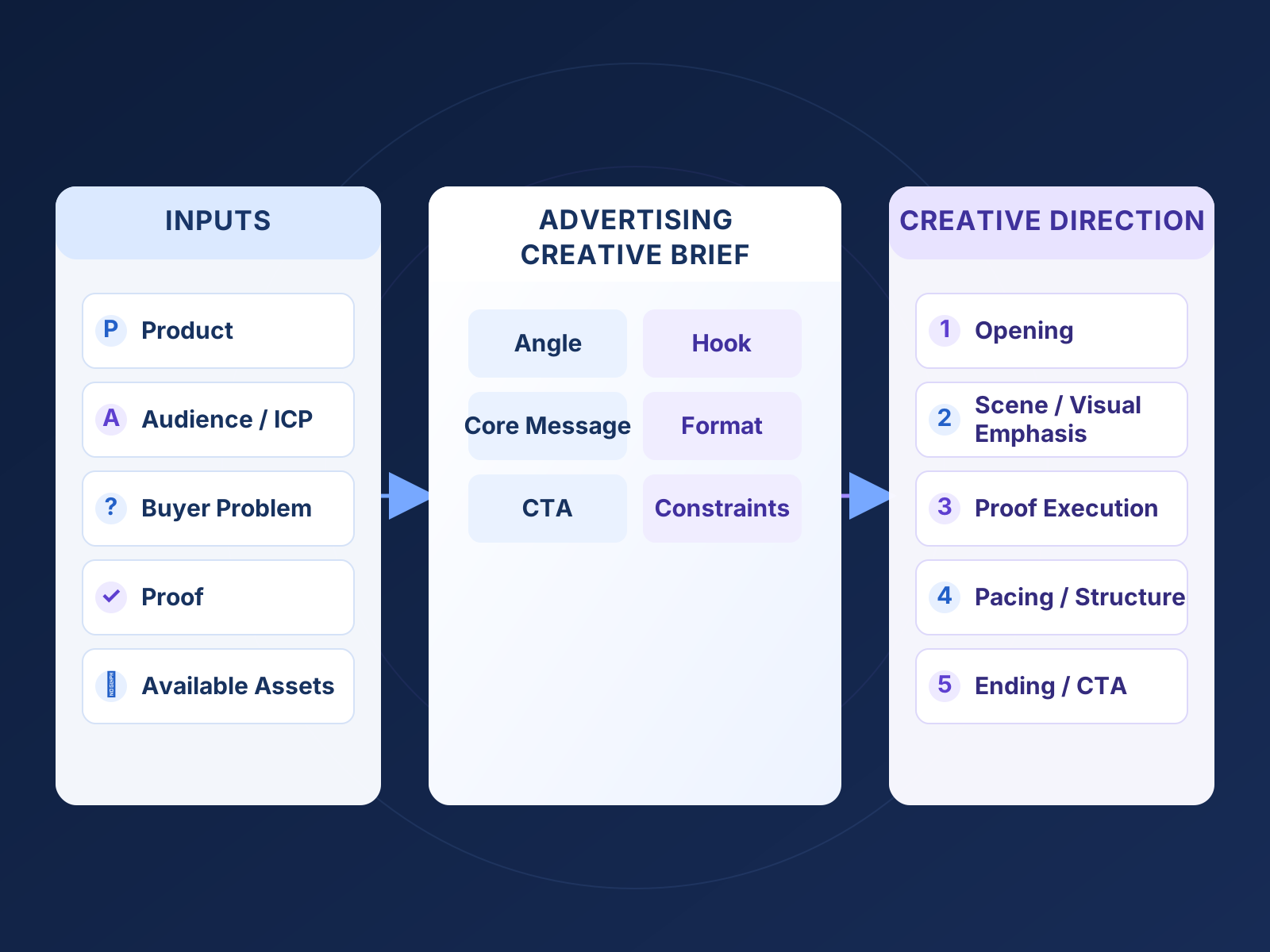
The brief sits between raw inputs and production direction:
Existing product assets → product and buyer context → creative angle → script or creative direction → scenes and video variations → human review.
It is the point where a team decides what the product should mean to a particular buyer before asking production to make the idea visual. From there, a script can specify spoken lines and scenes, while the available assets and format determine what can be built and reviewed.
For the broader planning, scripting, production, and iteration sequence, use the product video advertising workflow. The product video examples article can help when you are exploring how buyer questions translate into different formats.
Sprokl fits as an organizing layer on the creative-production side of this workflow. Teams can use their product assets and creative inputs to prepare more structured angles, scripts, and video variations for review and testing. The team still owns the brief, product accuracy, claims approval, campaign setup, measurement, and the decision about what to make next.
To use this template, choose one real product and one buyer problem. Complete the 14 fields, ask the reviewer to resolve any missing constraints, and then request or write one first creative direction. A clear brief is already useful before any tool enters the workflow.
Include the project context, product, audience, buyer problem, objective, angle, hook, core benefit, proof, source assets, format, CTA, deliverables, and review constraints. The copyable template above keeps those fields in one lightweight document.
It should be detailed enough to remove ambiguity about the buyer, message, proof, and execution requirements, but short enough to use for one project. If a field does not change a creative or review decision, it probably does not need more detail.
The brief sets the audience, problem, message, angle, proof, format, and constraints. The script turns that direction into the actual spoken words, visual actions, on-screen text, and sequence. The script can be revised while the brief remains the reference point for what the ad is meant to communicate.
Yes. Keep the product, audience, objective, and constraints stable, then create bounded variations in the angle, hook, proof, or format. That gives the team distinct directions to review without claiming in advance that one will perform best.
Keep exploring

Make the next creative move
Build, test, and iterate on ecommerce ad creatives faster with AI-powered concepts, scripts, and variations.